
Choosing the right WordPress hosting in the UK is the single biggest technical decision most businesses get wrong. Owners spend weeks perfecting their website design and copy, only to leave this critical choice to chance — a mistake that costs money in lost conversions, search visibility, and downtime.
In 2026, Core Web Vitals remain part of Google’s page experience signals, and your hosting infrastructure is one of the biggest variables affecting those metrics. A beautiful site on slow servers will struggle against a decent site on fast, optimised infrastructure.
But with hundreds of providers claiming to be “the best,” how do you cut through the noise? This guide isn’t about recommending specific brands (you’ll find that in our Best WordPress Hosting Providers in the UK Compared). Instead, it’s about teaching you how to evaluate options so you can make an informed decision that aligns with your budget and technical needs.
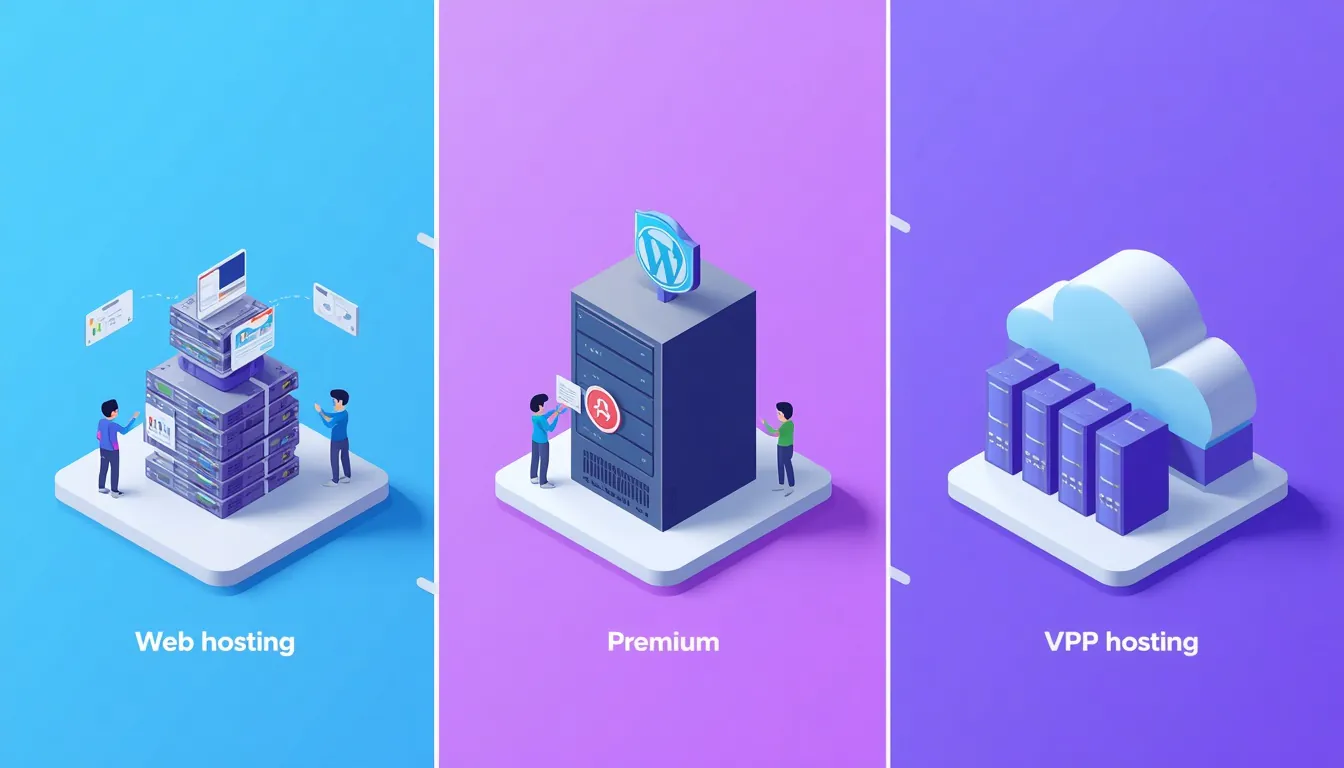
WordPress hosting types compared
Types of WordPress Hosting UK: What Fits Your Business?
Before looking at prices, you need to understand what kind of server environment you actually require. Not every business needs enterprise-grade cloud infrastructure, and not every small blog should settle for cheap shared hosting if security is a concern.
Best for: Hobby blogs, very low-traffic brochure sites (<5k visits/month).
Shared hosting places thousands of websites on one physical server. It’s the cheapest option (£3–£10/mo), but resources (CPU, RAM) are limited and often oversold. If a neighbour gets hacked or spikes in traffic, your site suffers. For any serious UK business, this is rarely recommended anymore due to performance risks impacting Core Web Vitals.
Managed WordPress Hosting
Best for: SMEs, agencies, e-commerce stores, professionals who value time over pennies.
This is the industry standard for businesses. The host handles server maintenance, security patches, automatic backups, and caching specifically tuned for WordPress. You get dedicated resources within a shared pool, ensuring stability. While more expensive (roughly £10–£60/mo, see the cost table below), it eliminates the technical burden of server administration. If you’re unsure if you need this level of control, read our guide on Why Use WordPress and its scalability requirements.
VPS / Cloud Hosting
Best for: High-traffic portals, custom applications, multi-site networks.
Virtual Private Servers give you root access and isolated resources. They scale horizontally (adding nodes) rather than vertically. This requires technical expertise to manage unless paired with a managed service layer. For most standard WooCommerce stores, managed WP hosting is sufficient, but complex setups might benefit from WordPress Multisite architectures hosted on robust cloud infrastructure.
Beyond VPS and cloud, there’s dedicated hosting — an entire physical server reserved for a single site. It’s the most expensive tier and usually only worth considering when compliance rules, very high traffic or unusually heavy workloads make shared infrastructure unsuitable. For most UK businesses, managed WordPress hosting on UK or EU servers remains the better balance of cost and performance.
WooCommerce & E-commerce Specific Needs
If you run an online store using WooCommerce, generic hosting advice often falls short. E-commerce sites are resource-intensive: they generate dynamic pages for every product view, cart update, and checkout step. This puts immense pressure on CPU and RAM compared to static brochure sites.
For UK-based e-commerce businesses, look for hosts that offer:
- Object Caching (Redis/Memcached): Essential for speeding up database queries during peak shopping hours.
- Staging Environments: Critical for testing payment gateway integrations without risking your live store.
- Scalable Resources: Traffic spikes from sales events (Black Friday, Christmas) can crash fixed-resource shared plans.
While managed WordPress hosting is usually sufficient for small stores, high-volume shops benefit from cloud infrastructure. For the bigger picture on running a store, start with The Complete WooCommerce Guide, then check our guide on Best WooCommerce Plugins and explore our specialised E-commerce Development Services.
The UK-Specific Advantage: Location, Law, and Support
Choosing a global giant like AWS or DigitalOcean directly can be tempting, but for UK-based businesses, local context matters significantly.

UK server location and latency
Server Location & Latency
Physical distance affects data travel time. If your customers are in London, Manchester, or Edinburgh, a server located in Virginia, USA, adds roughly 80–100ms to every round trip. A server in London typically responds in around 10ms or less, while Frankfurt or Dublin usually sit in the 10–30ms range.
This difference compounds across assets (CSS, JS, images). Over a page load, this can save seconds, directly improving your Largest Contentful Paint (LCP). We explain exactly How to Increase WordPress Speed via server choice in our dedicated article. You can verify your own server response times using WebPageTest.
GDPR & Data Sovereignty
Under UK GDPR, where your customers’ data is stored, and who can access it, matters. Hosts outside the UK can still be used legally, but transfers need a valid safeguard, such as the UK–US data bridge for certified US providers or an International Data Transfer Agreement (IDTA). Many UK businesses simply prefer UK or EU data centres to keep this paperwork simple. Whichever you choose, make sure your host offers a clear Data Processing Agreement (DPA) in line with ICO guidance.
Support Quality
When your site goes down at 2 PM GMT, do you want to chat with someone in a different timezone? Look for hosts offering 24/7 support with English-speaking teams familiar with the UK market. Poor support leads to extended downtime, which hurts both revenue and visitor trust, as discussed in Website Speed for Your New Website Design.
Green Hosting: Sustainability Matters in 2026
An increasing number of UK businesses are prioritising sustainability in their digital footprint. Traditional data centres consume vast amounts of energy, contributing significantly to carbon emissions. Green hosting providers offset this by using renewable energy sources (wind, solar) or purchasing Renewable Energy Certificates (RECs).
Does it cost more? Often, yes—typically £5–£10/month extra. But for B2B clients sensitive to ESG (Environmental, Social, and Governance) criteria, this investment enhances brand reputation. Moreover, many green hosts use modern hardware that is inherently more efficient, leading to better performance per watt.
If budget allows, consider eco-friendly options. We discuss long-term operational costs, including potential savings from efficiency, in our article on Monthly Website Costs UK.
How to Audit Your Current Hosting Performance
Unsure if your current provider is letting you down? You don’t need to guess. Run these three quick tests before making any decisions:
- TTFB Test: Use tools like WebPageTest or Pingdom to measure Time to First Byte. If it consistently exceeds 800ms, your server is likely too slow or geographically distant.
- Uptime Monitoring: Check historical uptime logs. Anything below 99.9% indicates reliability issues that cost you visitors and sales.
- Server Location Verification: Use a command-line tool or online traceroute to confirm where your data physically resides. If you’re targeting London customers but your server is in Singapore, latency will always suffer.
These metrics directly impact your Core Web Vitals scores. To fix the bottlenecks they reveal, see common causes of Slow Loading Web Pages.
How Much Does WordPress Hosting Cost in the UK? (2026 Estimates)
Budgeting correctly prevents sticker shock later. Here are realistic price ranges for 2026, excluding promotional intro rates (which often double upon renewal).

WordPress hosting UK cost tiers
| Tier | Monthly Cost (GBP) | Typical Features | Best For |
|---|---|---|---|
| Entry-Level Managed | £10 – £20 | Limited CPU/RAM, basic staging, email support included. | Small brochures, portfolios, startups. |
| Professional Mid-Range | £30 – £60 | Higher resource limits, daily backups, priority support, CDN integration. | Agencies, growing SMBs, light WooCommerce. |
| High-Performance Enterprise | £80+ | Auto-scaling, dedicated IPs, advanced security suites, account managers. | Large e-commerce, high-traffic news/media. |
Note: These are market averages. Always check renewal prices. Cheap introductory offers often mask long-term costs.
For a deeper dive into total project expenses beyond just hosting, see our breakdown of How Much Does a Website Cost? and Monthly Running Costs UK.
Essential Checklist Before Signing Up
Don’t commit until you’ve verified these five technical pillars. Missing even one can lead to costly fixes later.

Essential WordPress hosting checklist
- Migration Policy: Do they offer free, white-glove migration? Or is it self-service? Self-service saves money initially but risks errors. See our section below on Switching Hosts for details.
- Resource Limits: Ask specifically about PHP worker limits and memory caps. Low limits cause timeouts under load. Read about fixing Fatal Error Maximum Execution Time Exceeded to understand why this matters.
- Caching Layer: Does the host provide server-side caching (like Redis or Memcached)? Client-side plugins help, but server-level cache is faster. Learn more in The Best WordPress Cache Plugins.
- Security Suite: Is WAF (Web Application Firewall) included? Malware scanning? SSL certificates? Security shouldn’t be an add-on fee. Refer to Best WordPress Security Plugins and WordPress Security Best Practices.
- Developer Tools: SSH access, Git deployment, WP-CLI availability? Critical for workflows involving WordPress Theme Development.
Common Hosting Mistakes UK Businesses Make
Even after careful selection, businesses fall prey to avoidable errors. Here are the top four pitfalls we see frequently among South London and wider UK clients:
- Choosing Based Solely on Price: Saving a few pounds a month isn’t worth the cost of downtime or lost sales. Cheap shared hosting often lacks adequate security patches.
- Ignoring Backup Strategies: Relying exclusively on your host’s automated backups is risky. Always maintain an off-site copy. See our guide on WordPress Maintenance Plans for best practices.
- Neglecting SSL Certificates: Operating without HTTPS kills user trust and hurts search rankings. Ensure your host provides free Let’s Encrypt certificates with auto-renewal.
- Overlooking Migration Planning: Assuming migration is “plug-and-play.” Complex sites require staged moves to prevent broken links or mixed content warnings. Allow time for testing before you switch over.
Switching Hosts? What to Expect During Migration
Many UK businesses hesitate to change their hosting provider because they fear downtime or data loss. While modern managed hosts often offer free migration services, it’s not always seamless—especially if your site relies on custom configurations, specific PHP versions, or complex WooCommerce setups.
Here is what you need to know before moving your WordPress site to a new home.

WordPress site migration between hosts
The Risks of DIY Migration
If you attempt to move your site yourself using FTP and database exports, watch out for these common pitfalls:
- Mixed Content Errors: After switching domains or protocols, old HTTP links may break security certificates. Fix this quickly with our guide on how to resolve mixed content issues in WordPress.
- Broken Resources: Images or scripts failing to load due to path changes can ruin user experience immediately. Troubleshoot these fast with our fix for failed resource loading errors.
- Server Configuration Mismatches: New servers might have different PHP limits or caching rules, leading to critical failures like the dreaded White Screen of Death or 500 Internal Server Errors after migration.
- Memory Limit Issues: Smaller plans may hit memory ceilings during import. Resolve this via our WordPress Memory Size Fix.
- Installation Conflicts: Sometimes folders persist incorrectly. Handle duplicates with our guide on Destination Folder Already Exists.
Backup First, Always
Before any migration, ensure you have a full backup of your site—files and database. Most managed hosts provide automated backups, but having your own copy stored off-site is non-negotiable. Never rely solely on the host’s safety net.
How Long Does It Take?
- Standard Site: 2–4 hours for professional handling.
- Complex E-commerce/WooCommerce: 4–12 hours, requiring rigorous testing of checkout flows and API integrations.
- DIY Attempt: Often takes longer due to troubleshooting unexpected bugs.
For a step-by-step breakdown of the safe process, including DNS propagation tips and pre-move checklists, refer to our comprehensive resource: The Complete WordPress Migration Guide.
When to Hire a Professional
While some hosts provide automated migration tools, they rarely optimise your site during the transfer. A professional migration ensures:
- Zero downtime via staging environments.
- Immediate post-move SEO checks (redirects, sitemaps).
- Performance tuning tailored to your new server specs.
💡 Need Help Moving Your Site?
As an independent WordPress specialist based in South London, I handle migrations daily for UK clients. Whether you’re moving from shared hosting to managed cloud, or consolidating multiple sites, I ensure a smooth transition without breaking your live store.
👉 Discuss Your Migration Project Here
Ready to Compare Providers?
Now that you understand the types of hosting, UK-specific factors, cost structures, and migration realities, you’re equipped to make a smart choice.
We maintain a regularly updated list of the top performers in the UK market, tested for speed, support quality, and ease of use.
👉 See the Detailed Comparison: Best WordPress Hosting Providers in the UK (2026)
Beyond Hosting: Maintenance & Growth
Choosing a host is just the beginning. To keep your investment secure and fast, ongoing care is essential.

Ongoing WordPress hosting maintenance and growth
- Keep It Fast: Regularly audit your performance using our guide on Clearing WordPress Cache.
- Keep It Secure: Implement proactive measures outlined in WordPress Security Best Practices.
- Keep It Updated: Consider a structured approach to updates and backups. Read about WordPress Maintenance Plans to see how regular upkeep saves money long-term.
- Extend Functionality: Once hosted, leverage the right tools. Explore our recommendations for Best WooCommerce Plugins and general Best WordPress Plugins to enhance your site’s capabilities.
If you’d rather focus on running your business while we handle the tech, explore our Website Maintenance Services, Monthly Subscription Options, or our detailed WordPress Website Maintenance Guide.
Not sure which host is right for you?
I’ve been building WordPress sites for over 20 years and can help you pick the right hosting setup — and handle the technical side so you don’t have to.
No obligation. Just clear, straightforward advice.
WordPress Hosting Glossary: Terms You’ll See
Hosting providers love jargon. Here’s what the most common terms actually mean:
| Term | What it means |
|---|---|
| TTFB (Time to First Byte) | The time between a browser requesting a page and receiving the first byte of data. Under 400ms is excellent, 400–800ms is acceptable, over 800ms is slow. |
| LCP (Largest Contentful Paint) | A Core Web Vital measuring how long it takes for the largest visible element on a page to load. Google recommends under 2.5 seconds. |
| WAF (Web Application Firewall) | A security layer that filters incoming traffic and blocks common attacks like SQL injection and cross-site scripting. |
| Object Caching (Redis / Memcached) | A server-level cache that stores database query results in memory. Dramatically speeds up WooCommerce stores and membership sites. |
| Staging Environment | A private copy of your site where you can test updates, plugins, or redesigns without affecting the live version. |
| LiteSpeed / NGINX / Apache | The three main web server software types. LiteSpeed and NGINX are generally faster than Apache for WordPress, especially under load. |
| SLA (Service Level Agreement) | A formal commitment from the host about uptime (usually 99.9%+). Read the fine print — some SLAs only apply to enterprise plans. |
| DPA (Data Processing Agreement) | A legal document required under UK GDPR that defines how the host handles your customers’ personal data. |
Understanding these terms makes it much easier to compare providers on equal footing. For deeper context on any of them, see our detailed comparison of UK providers.
Frequently Asked Questions (FAQ)
Is local UK hosting faster than US hosting?
Yes. Lower latency means quicker Time to First Byte (TTFB). For UK audiences, a London or Dublin server typically performs significantly better than transatlantic alternatives, positively impacting Core Web Vitals.
Do I need managed hosting for a small business website?
Generally, yes. The time saved on server management, security patching, and backups far outweighs the extra £10–£20/month compared to shared hosting. It also mitigates risks associated with common configuration errors.
Can I switch hosts later if I make a mistake?
Absolutely. However, migration carries risks like broken links or mixed content warnings. Using a professional migration service minimises downtime and SEO impact. See our Migration Guide for details.
What is the difference between cPanel and custom dashboards?
cPanel is universal but bloated. Custom dashboards (like those from Kinsta or Rocket.net) are streamlined for WordPress, often offering better performance monitoring and easier caching controls. Both work well if configured correctly.
Does server location affect Google rankings in the UK?
Indirectly, yes. Google uses page speed and user experience signals in its ranking systems. Faster servers improve these signals and help you compete against slower sites. Learn more about WordPress speed.
How do I test my current hosting speed?
Use external tools like GTmetrix, Pingdom, or WebPageTest. Focus on TTFB (Time to First Byte). A healthy TTFB for UK servers should be under 400ms. If it’s higher, your host may be overloaded or poorly configured.
Is cheap hosting ever good enough?
For hobby blogs or very low-traffic informational sites, perhaps. But for any business relying on the website for leads or sales, no. The hidden costs of downtime, poor support, and security vulnerabilities far exceed the monthly savings. Consider the total cost of ownership discussed in Website Cost Analysis.
What hosting do you recommend for a UK business?
I generally recommend Managed WordPress Hosting with UK/EU data centres for most SMEs. It balances performance, security, and ease of management. However, the “best” choice depends on your specific traffic volume and technical comfort level. Check the cost table above for typical price ranges, or contact me for a personalised audit.
Can I host multiple WordPress sites on one plan?
Yes, many managed hosts allow multiple installs on higher-tier plans. Alternatively, you can set up a WordPress Multisite network, which shares resources across sub-sites. This is great for agencies managing several client brochures. Understand the architecture differences in our guide to WordPress Multisite.
If you’re still weighing up WordPress against other platforms, our guide to why use WordPress in 2026 covers 10 reasons it leads the market.

With over two decades of web design and development expertise, I craft bespoke WordPress solutions at FallingBrick, delivering visually striking, high-performing websites optimised for user experience and SEO.