
Wireframing is one of the most useful steps in the web design process. A wireframe helps you agree the structure, content hierarchy and user flow before investing time in visual styling or development. That makes it easier to spot usability problems while changes are still straightforward.
The right tool depends on the fidelity you need, how you work with clients or developers, and whether you need a clickable prototype or simply a quick sketch. This guide compares nine active tools, explains their free plans and trials, and separates current products from legacy software. Plan details were checked on 5 October 2026; features and prices can change.
The Best Wireframing Tools for UI/UX Designers
Why Wireframing Matters in UI/UX Design
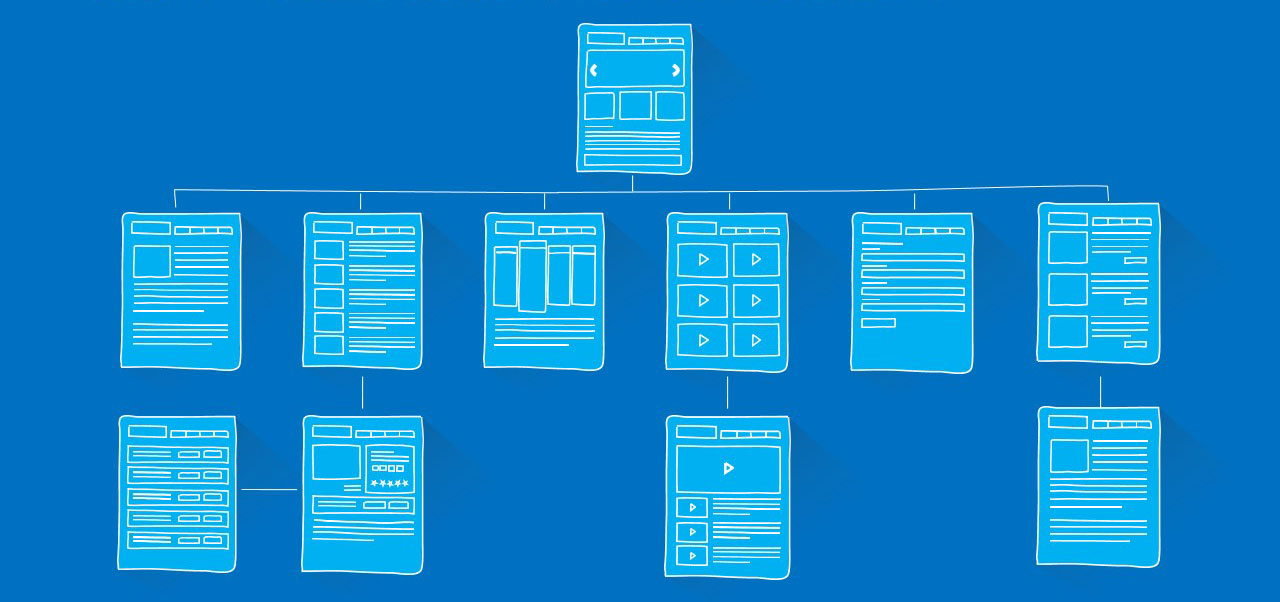
Wireframes are blueprints for a web page or application screen. They show the layout, hierarchy and intended interactions without requiring a finished visual design. They can help you:
- Plan the structure and priority of content on a page or screen.
- Map navigation and user journeys before choosing a visual direction.
- Find usability issues early, when they are usually less expensive to fix.
- Compare alternative layouts without getting distracted by colour and typography.
- Explain a design idea to clients, developers and other stakeholders.
A wireframe is not a substitute for user research or usability testing, but it gives a team something concrete to discuss before detailed design begins.

The Importance of Wireframing in UI/UX Design
What to Look for in a Wireframing Tool
Before choosing software, decide what the team actually needs. A dedicated low-fidelity tool can be quicker for early ideas, while a broader design platform may take a wireframe through to a polished interface and developer handoff.
- Fidelity and prototyping: Do you need a rough layout, a high-fidelity design, clickable screens, or more complex interactions and conditional logic?
- Ease of use: Is the tool quick for occasional sketches, or is your team prepared to learn a more capable design application?
- Collaboration: Check whether co-editing, comments and client review are available, and whether they depend on a paid plan, seat or account.
- Platform: Separate the design editor from prototype viewing. For example, Sketch’s editor requires a Mac, while its web app supports review on other platforms.
- Handoff and integrations: Consider whether the tool fits your design-system, project-management and developer workflows.
- Privacy and sharing: Find out whether a free share link is public, whether guests need an account, and how project access is controlled.
- Plan limits and billing: Compare files, projects, pages, seats, exports and trial length—not just the headline price. For a UK purchase, confirm the currency and VAT in the checkout.
Best Wireframing Tools in 2026: Quick Comparison
These are different types of products rather than interchangeable versions of one tool. Use the “best suited to” column to shortlist the tools that match your workflow.
| Tool | Best suited to | Platform and collaboration | Free option or trial |
|---|---|---|---|
| Figma | Collaborative UI/UX work from wireframe to handoff | Browser editor; desktop apps for macOS and Windows; sharing and editing depend on permissions and seats | Starter plan; unlimited personal Drafts, with limits on shared team files and pages |
| Balsamiq | Fast, deliberately low-fidelity sketches | Cloud/web, Desktop, and separate Jira/Confluence apps; real-time editing is not available in Desktop | 14-day Cloud trial; no permanent general-purpose free plan |
| UXPin | Interactive prototypes using code-backed components | Browser editor; desktop apps may be available to paid customers on request | Free plan with a limited number of prototypes and AI credits |
| Sketch | Interface design for teams whose editors work on Mac | Mac design app; browser-based review, comments and inspection on other platforms | 30-day trial; no general free plan |
| Wireframe.cc | Minimal, quick low-fidelity wireframes | Browser-based; free saved links are public to people who have the link | Free single-page use; privacy and multi-page work require a paid plan |
| Axure RP | Complex flows, conditional logic and functional prototypes | Windows and macOS editor; prototypes can be shared and viewed in a browser | 30-day RP trial; Axure Cloud has a separate free offering |
| draw.io / diagrams.net | Simple wireframes, diagrams and user flows | Browser editor and desktop apps for Windows, macOS and Linux; storage choice affects collaboration | Free core editor and desktop app; Atlassian apps are separate |
| Moqups | Wireframes, diagrams and interactive prototypes in one browser app | Cloud-based editor with online collaboration; team features vary by plan | Free plan: one user, two active projects and usage limits |
| Marvel | Accessible browser-based wireframing and prototyping | Browser-based design, sharing and collaboration | Free plan: one user and one project |
UK pricing note: Pricing is dynamic. Several vendors show public prices in USD (or a dollar sign without a confirmed currency code), and a public USD figure is not a UK price in GBP. Confirm the billing currency, VAT, billing period and number of paid seats in the vendor’s UK checkout before choosing a plan. Links to official pricing pages are included below.
The Best Wireframing Tools in 2026
1. Figma

The Best Wireframing Tools: Figma
Figma combines wireframing with interface design, components, interactive prototyping and developer handoff. It is a broad collaborative design platform, so a team can continue from a rough layout into a more detailed design without moving every stage into a different application.
Useful features include auto layout for adapting interface elements, variables for reusable design values, interactive prototypes, shared libraries and Dev Mode. FigJam provides a separate collaborative whiteboard for early ideas. Figma also offers AI-assisted features, but their availability and limits can depend on the plan, seat and current product rollout.
The editor is available in a browser and through desktop apps for macOS and Windows. People can view and comment according to their permissions; editing, Dev Mode and some advanced features depend on the type of seat and plan. Offline use is limited and does not provide full real-time collaboration.
| Strengths | Things to consider |
|---|---|
|
|
Free plan: Starter includes unlimited personal Drafts, but that does not mean unlimited shared team files. The current Starter team folder allows up to three Figma Design/Sites files combined, plus up to three FigJam files and three Slides files; each shared design file is limited to three pages. Check the current Figma pricing and plan guide before relying on a specific quota.
Best suited to: UI/UX designers, freelancers and teams that need to collaborate across wireframes, visual design and developer handoff.
2. Balsamiq Wireframes
The Best Wireframing Tools: Balsamiq Wireframes
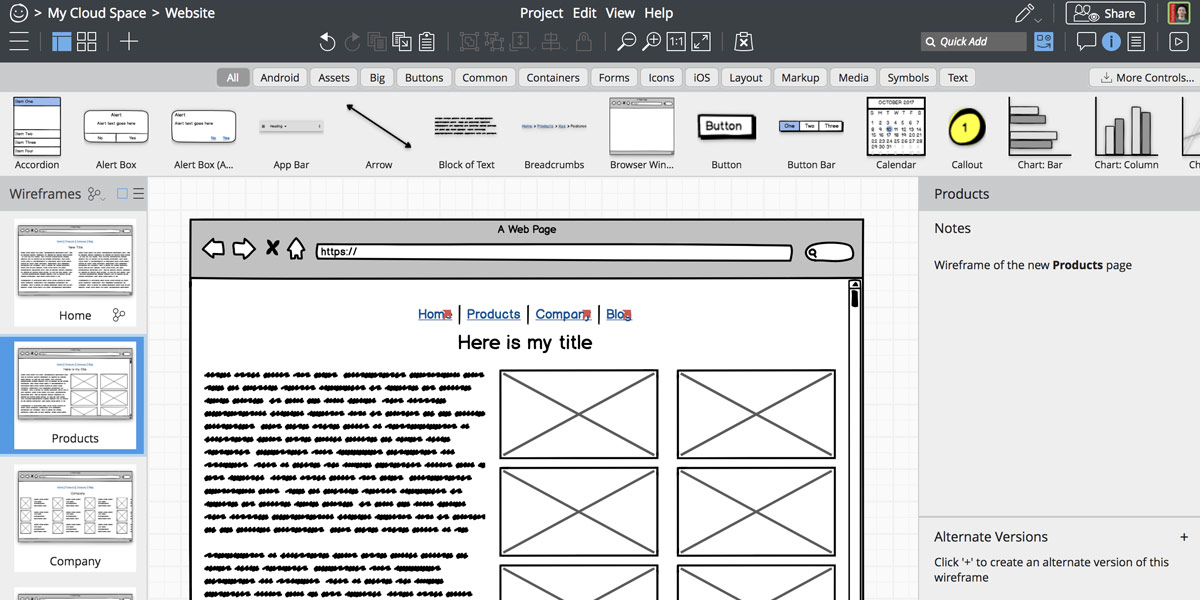
Balsamiq is designed for low-fidelity wireframes with a deliberately sketch-like appearance. That visual roughness can help keep early discussions focused on page structure and flow rather than colours, fonts or final styling.
Balsamiq provides a library of interface components, drag-and-drop editing, comments and clickable low-fidelity prototypes. Its Cloud product supports real-time collaboration. Separate applications are available for Jira and Confluence. The Desktop app is different: it does not support real-time co-editing and is being retired, with sales of new Desktop licences scheduled to end on 31 December 2026 and support ending on 31 December 2027.
| Strengths | Things to consider |
|---|---|
|
|
Free plan: Balsamiq Cloud currently offers a 14-day trial rather than an ongoing free plan. The official pricing page shows the current subscription options. Balsamiq Desktop has a separate licensing model and retirement timeline; do not assume its one-off licence will remain available indefinitely.
Best suited to: Early-stage ideation, product owners and designers who want feedback on structure before moving into high-fidelity design.
3. UXPin

The Best Wireframing Tools: UXPin
UXPin is aimed at teams that need more than static screens. It supports interactive prototypes with conditions and variables, and its Merge feature can bring code-backed components into a design workflow. This can help teams keep prototypes closer to the components used by developers, provided the components and integrations are configured for that purpose.
UXPin also provides component libraries, collaboration and Forge AI tools for generating or editing interface layouts. AI output depends on the selected library and plan; it should not be treated as a replacement for designing complex interaction logic or testing a finished product.
| Strengths | Things to consider |
|---|---|
|
|
Free plan: UXPin currently lists a limited Free plan, including two prototypes and a monthly allocation of AI credits. The limits and which libraries are available can change; check the UXPin pricing page. Paid plans are charged by seat, and public prices should not be assumed to be GBP.
Best suited to: Product teams building interactive prototypes with code-backed components or more complex interface behaviour.
4. Sketch

The Best Wireframing Tools: Sketch
Sketch is a design application for Mac that supports interface design, wireframing, prototyping and shared component libraries. Its web app allows people on other platforms to review, comment on and inspect shared documents, but the design editor itself requires macOS.
Sketch supports collaboration through a shared Workspace and documents. Real-time editing depends on a subscription, permissions and a compatible Mac app. This distinction matters for teams: a client can review a design in a browser, but a Windows user cannot use the web viewer as the full design editor.
| Strengths | Things to consider |
|---|---|
|
|
Free plan: Sketch currently offers a 30-day trial rather than a general free plan. Viewer access is included for people reviewing shared documents, but it is not a substitute for an editor seat. See the current Sketch plans for subscription details.
Best suited to: Designers already working on Mac, especially teams using Sketch Libraries and a shared Workspace.
5. Wireframe.cc
The Best Wireframing Tools: Wireframe.cc
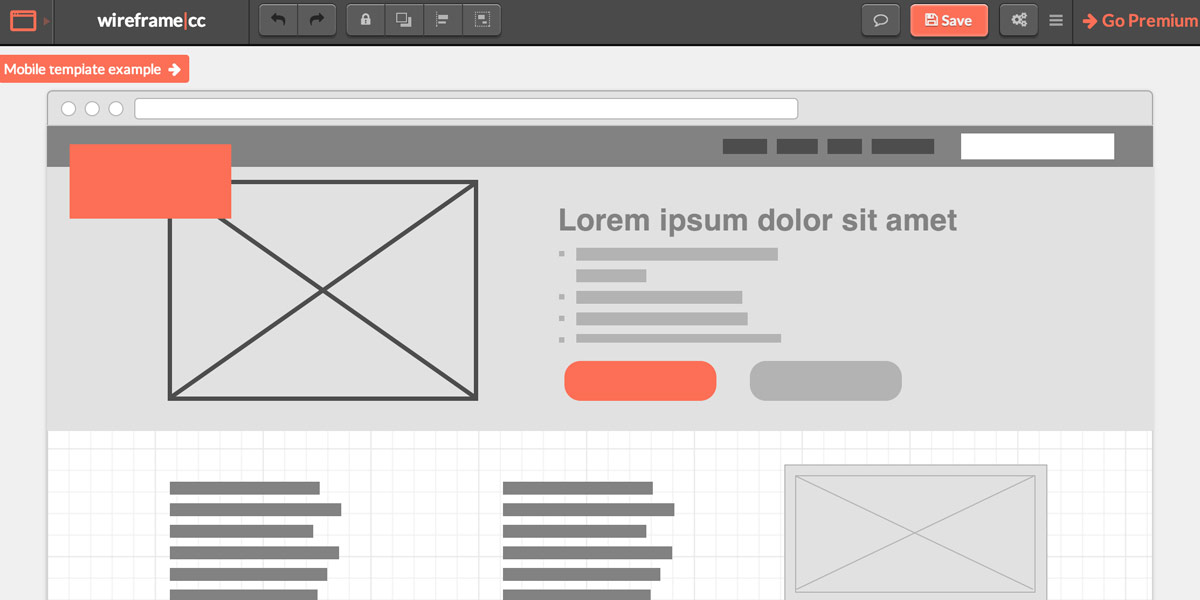
Wireframe.cc is a minimal browser-based tool for sketching simple page and screen layouts. Its limited interface can be an advantage when the goal is to make a quick low-fidelity wireframe without setting up a full design system.
The free option is intentionally restricted. Saved free wireframes have a shareable URL and can be viewed by people who have the link, so do not use that setting for confidential work. Paid plans add private projects, multiple pages, linked screens for simple clickable flows and export options. These are useful additions, but Wireframe.cc is still a lightweight wireframing product rather than a full interface-design suite.
| Strengths | Things to consider |
|---|---|
|
|
Free plan: The free version is limited to single-page wireframes. Check the Wireframe.cc pricing page for current plan features and sharing controls before using it for client work.
Best suited to: Non-designers, workshops and early ideation where a quick sketch is more useful than a polished prototype.
6. Axure RP
Axure RP for Advanced Wireframing and Prototyping
Axure RP is a desktop application for wireframes and functional prototypes. Its distinctive capabilities include conditional interactions, variables, dynamic panels, repeaters and adaptive views. These features let a prototype represent more complex flows than a set of static screens.
Axure RP is available for Windows and macOS. Prototypes can be published for browser viewing and review; the browser viewer is not the same as a full web-based editor. Axure Cloud is a separate product for hosting and collaboration, with its own plans and limits.
| Strengths | Things to consider |
|---|---|
|
|
Free plan: Axure RP offers a 30-day trial. Axure Cloud has a separate free offering, including limits for whiteboards and documents and hosting for prototypes; do not confuse that with a free RP editor. See Axure RP pricing and Axure Cloud pricing.
Best suited to: UX teams that need detailed interaction logic, conditional states or complex prototypes for review and testing.
7. Moqups
Moqups brings wireframes, diagrams and interactive prototypes into a browser-based workspace. It can support a project from a rough layout through more detailed screens and linked interactions, without requiring a native Windows application.
Moqups includes reusable stencils, templates and online collaboration features. The free plan is useful for trying the workflow, but it has limits on projects, objects, image storage and guest access. Published help pages have not always described free export limits consistently, so check the current app before relying on a particular export format.
| Strengths | Things to consider |
|---|---|
|
|
Free plan: The plan information checked for this guide lists one user, two active projects, up to 400 objects per project, 25 MB for images and seven guests. Limits can change; see the Moqups pricing page and its subscription help.
Best suited to: Individuals and small teams who want wireframing, diagrams and interactive prototypes in one browser-based product.
8. Marvel
Marvel is an active browser-based tool for wireframes, mockups and interactive prototypes. Users can connect screens with hotspots and transitions, share a prototype and collaborate on design review. The product also offers handoff and testing features, with availability depending on the plan.
Marvel is worth considering when a team wants a simple path from screen layouts to a shareable prototype. It should not be described only as a basic wireframer: its feature set also includes collaboration and developer handoff.
| Strengths | Things to consider |
|---|---|
|
|
Free plan: The current free plan is limited to one user and one project. If you downgrade with additional projects, those projects and their shared links, comments and test results become inactive rather than remaining fully usable. Check the Marvel pricing page before moving active client work onto a free account.
Best suited to: Beginners and small teams who want to make and share clickable prototypes in a browser.
9. draw.io / diagrams.net
draw.io (diagrams.net) is primarily a diagramming tool, but its shape libraries and templates can also be used for simple page mockups, wireframes and user flows. It is a practical option when the goal is to map a structure or process rather than build a high-fidelity interface prototype.
The core web editor and desktop applications are free, and the editor is open source under the Apache 2.0 licence. The online editor can use storage providers such as Google Drive; the desktop app is available for Windows, macOS and Linux. Confluence and Jira integrations are separate Marketplace applications, and may have their own trial, licence and billing rules.
| Strengths | Things to consider |
|---|---|
|
|
Free plan: The core web and desktop editors are free; there is no per-user subscription for the basic editor. Do not assume that every Marketplace integration is free. Check the draw.io website and the relevant Confluence integration information for current terms.
Best suited to: Teams who need free diagrams, flowcharts or straightforward wireframes rather than a dedicated high-fidelity design environment.
How to Evaluate and Choose a Wireframing Tool
Free Wireframing Tools and Trials
“Free” can mean an ongoing plan, a short trial, a free viewer seat or an educational licence. They are not interchangeable. The main options in this guide are:
- Ongoing free plans or free core products: Figma Starter, UXPin Free, Wireframe.cc’s single-page option, Moqups Free, Marvel Free and the core draw.io/diagrams.net editor.
- Time-limited trials: Balsamiq Cloud (14 days), Sketch (30 days) and Axure RP (30 days), as listed by their vendors when checked for this guide.
- Separate free access: Axure Cloud is a different product from Axure RP; free viewers or reviewers in tools such as Figma, Sketch or Balsamiq are not the same as free editing seats.
- Legacy products: Adobe XD is in maintenance mode and InVision has shut down. Neither should be counted as a current, general-purpose free wireframing recommendation.
Before starting a client project, check whether a free plan restricts private files, the number of pages, editing seats, exports or access to shared links. Those limits often matter more than the fact that the plan costs nothing.
A Note on Adobe XD and InVision
Adobe XD and InVision used to appear in many tool round-ups, but neither belongs in a list of active options for a new project.
Adobe XD: Adobe describes XD as being in maintenance mode. It is not receiving new features, although Adobe says it continues to support existing customers with bug fixes and security or privacy updates. Adobe has not announced a specific end-of-support date in the guidance checked for this article, and its official FAQ does not recommend Figma as a successor. If you still use XD, check your account and cloud access and keep local copies or exports of important work. Figma may be one editorial alternative to evaluate, not an official Adobe migration recommendation. See Adobe’s XD FAQ.
InVision: InVision’s design and collaboration services, including Prototype and Design System Manager, ended on 31 December 2024. The former Freehand service and its migration-token process are no longer available. If you already have a local .RTB export, Miro’s import guide describes how to try importing it, but comments and prototypes do not all transfer as editable objects. Do not assume that an old InVision account can still be accessed or migrated.
How to Choose the Right Wireframing Tool
Start with the task, not the most feature-rich product. A simple layout sketch and a logic-heavy prototype have different requirements.
- For team UI/UX design from wireframe to handoff: Start by evaluating Figma. Check the Starter file limits and the seats your team needs.
- For low-fidelity discussion: Compare Balsamiq Cloud with Wireframe.cc. Balsamiq has a broader low-fi workflow; Wireframe.cc is more minimal, but its free sharing is public to people with the link.
- For design on Mac: Consider Sketch if the people editing can use the Mac app. Other stakeholders can review through the web app, but that is not a full web editor.
- For component-led prototypes: Evaluate UXPin if you need to connect interface work to code-backed components.
- For complex interaction logic: Compare Axure RP with UXPin and test a representative flow during the trial.
- For a browser-based combination of wireframes, diagrams and prototypes: Try Moqups or Marvel, then check whether their free-plan limits fit the project.
- For simple flowcharts and mockups at no software cost: Use draw.io/diagrams.net, while treating Jira or Confluence apps as separate products.
For client work, test one real page or user journey before committing. Check how the tool handles comments, access permissions, version history and the handoff your developer needs.
Conclusion
There is no single wireframing tool that is best for every project. Figma covers a broad collaborative UI/UX workflow; Balsamiq and Wireframe.cc focus on quick low-fidelity work; UXPin and Axure RP support more involved prototyping; Sketch is an option for Mac-based design teams; and Moqups, Marvel and draw.io/diagrams.net suit different browser-based, prototyping or diagramming needs.
Choose the simplest tool that supports the fidelity, collaboration and handoff your project actually requires. Check the current plan limits and UK checkout before paying, especially where a free plan separates personal drafts from shared team files or where public prices are displayed in another currency.
For more on how wireframing fits into a professional design process, read our guides to low-fidelity wireframes and high-fidelity wireframes, or explore our usability testing guide. You can also learn more about our web design services.
FAQs
What is a wireframe and why do I need one?
A wireframe is a simplified layout of a web page or application screen. It shows the structure, content hierarchy and sometimes key interactions without the final visual styling. Teams use wireframes to discuss layout and user journeys before committing to detailed design or development.
What is the best wireframing tool for beginners in 2026?
It depends on what you want to make. Figma is a broad starting point if you want to learn interface design and prototyping as well as wireframing. Balsamiq is focused on low-fidelity sketches, while Wireframe.cc is suited to very simple layouts. Try the free plan or trial with a small example before choosing.
What is the difference between a wireframe and a prototype?
A wireframe shows the structure of a screen or page. A prototype connects screens or adds interactions so someone can experience part of a user journey. Some tools support both, but the depth varies: a simple linked flow is not the same as a prototype with conditional logic and dynamic states.
Does Figma have a free plan?
Yes. Figma Starter includes unlimited personal Drafts, but it limits shared team files and pages. Drafts are not the same as files in a shared team folder. Current Starter quotas can change and are separated by product type, so check the Figma pricing FAQ before planning a team workflow.
Which wireframing tools work on Windows?
Figma, Balsamiq Cloud, UXPin, Wireframe.cc, Axure RP, Moqups, Marvel and draw.io/diagrams.net can be used on Windows through a browser or supported application. Sketch’s design editor requires a Mac, although its web app lets people on other platforms review and inspect shared documents.
Can I wireframe in a browser without installing software?
Yes. Figma, Balsamiq Cloud, UXPin, Wireframe.cc, Moqups, Marvel and draw.io/diagrams.net offer browser-based workflows. Axure RP prototypes can be viewed in a browser, but the RP editor is a desktop application. Sketch’s browser app is for review and inspection rather than full design editing.
Is Adobe XD still worth using in 2026?
Adobe XD is in maintenance mode: Adobe says it is not receiving new features, while existing customers may continue to receive bug fixes and security or privacy updates. That makes it a less suitable choice for a new project than an actively developed product. Check your licence and cloud access before changing an existing workflow, and keep local copies of important files.
What happened to InVision?
InVision ended its design and collaboration services on 31 December 2024. The former Freehand service and migration-token process are no longer available. If you have a local .RTB export, check Miro’s current import instructions and review the result carefully because some comments and prototype elements may not remain editable.
What are the different types of wireframes?
Low-fidelity wireframes are quick, rough sketches that help with early ideas. Medium-fidelity wireframes define more of the layout and content. High-fidelity wireframes include greater visual detail and can be used for stakeholder review or to prepare for development. Read our guides to low-fidelity wireframes and high-fidelity wireframes.
Can a wireframing tool replace usability testing?
No. A wireframe or prototype can help you test a concept, but it does not replace observing representative users or checking whether they can complete important tasks. Choose a prototype that is realistic enough for the question you want to answer, then use an appropriate usability testing process.

With over two decades of web design and development expertise, I craft bespoke WordPress solutions at FallingBrick, delivering visually striking, high-performing websites optimised for user experience and SEO.