Web design moves quickly, and keeping your toolkit current makes a real difference to both the quality of your work and how efficiently you can deliver it. In 2026, the range of free and freemium tools available to designers and developers is genuinely impressive — covering everything from UI design and prototyping to code editing, version control, graphics, and performance testing. This guide covers the best free Web Design Tools available right now, along with honest notes on what each one does well and where it fits in a modern workflow.
These are free and freemium tools for the web design workflow. If you’re looking for a platform to build a complete website, see our guide to free website design software.
Design and Prototyping

Web Design Tools: Figma
Figma
Figma has become the industry standard for UI design and prototyping — and for good reason. Its browser-based architecture means your designs are always accessible and always in sync, with no need to pass files between team members. Real-time collaboration, shared component libraries, and a plugin ecosystem covering everything from accessibility checking to icon packs make it a genuinely complete design environment.
The free plan covers most solo designers’ needs: up to three projects, unlimited personal files, and access to the core design and prototyping tools. Teams working on multiple projects simultaneously will eventually need a paid plan, but for freelancers and smaller studios, the free tier is substantial.
In 2026, Figma also offers AI-assisted design features — including layout suggestions and auto-generation of design variants — making it an even faster tool for iterating on ideas.
Website: Figma
Web Design Tools: Penpot
Penpot
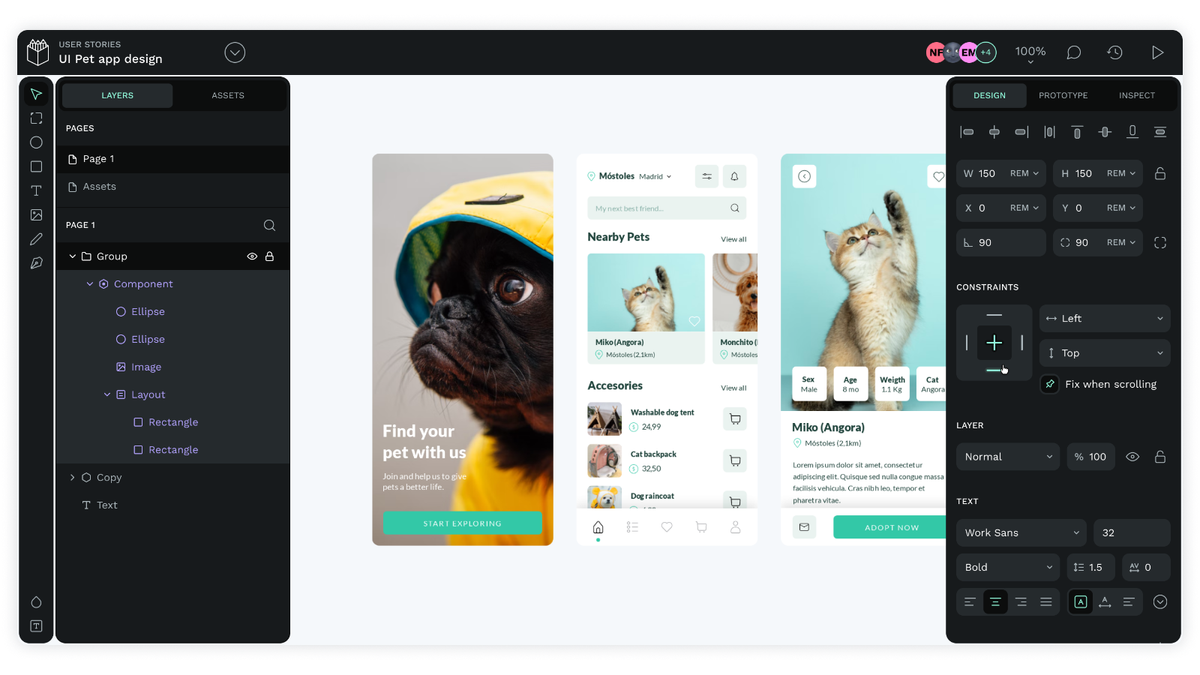
Penpot is the standout open-source alternative to Figma — free to use, self-hostable, and built on open web standards (SVG-based rather than proprietary formats). It supports real-time collaboration, vector design, interactive prototyping, and shared design systems.
For teams who need full control over their data, or organisations with privacy requirements that make cloud-hosted tools impractical, Penpot is a strong choice. It’s also a natural home for designers who prefer not to depend on a single commercial vendor. Development has been active and the feature set has grown considerably in recent releases.
Website: Penpot

Web Design Tools: Sketch
Sketch (Free for Students)
Sketch remains a well-regarded design tool, particularly in studios that have been using it for years and have built up extensive component libraries and workflows around it. It’s Mac-only, which limits its reach, but it’s clean, fast, and has an excellent plugin ecosystem.
The free tier is available to students, and there’s a free trial for everyone else. For new designers starting fresh in 2026, Figma is probably the better default — but Sketch is worth knowing about, particularly if you’re working with a team that already uses it.
Website: Sketch
Code Editors

Web Design Tools: Visual Studio Code
Visual Studio Code
VS Code remains the dominant code editor — free, fast, and backed by an enormous extension ecosystem. It handles syntax highlighting, intelligent code completion, integrated debugging, and Git version control out of the box, and the extension library covers virtually every language, framework, and workflow you could need.
The GitHub Copilot integration (available as a free tier for individual users) has made VS Code significantly more capable as an AI-assisted development environment, handling everything from code completion to explaining unfamiliar functions and suggesting fixes for errors.
For web designers who write code, or developers building web projects, VS Code is the clear default choice in 2026.
Website: Visual Studio Code
Web Design Tools: Cursor
Cursor
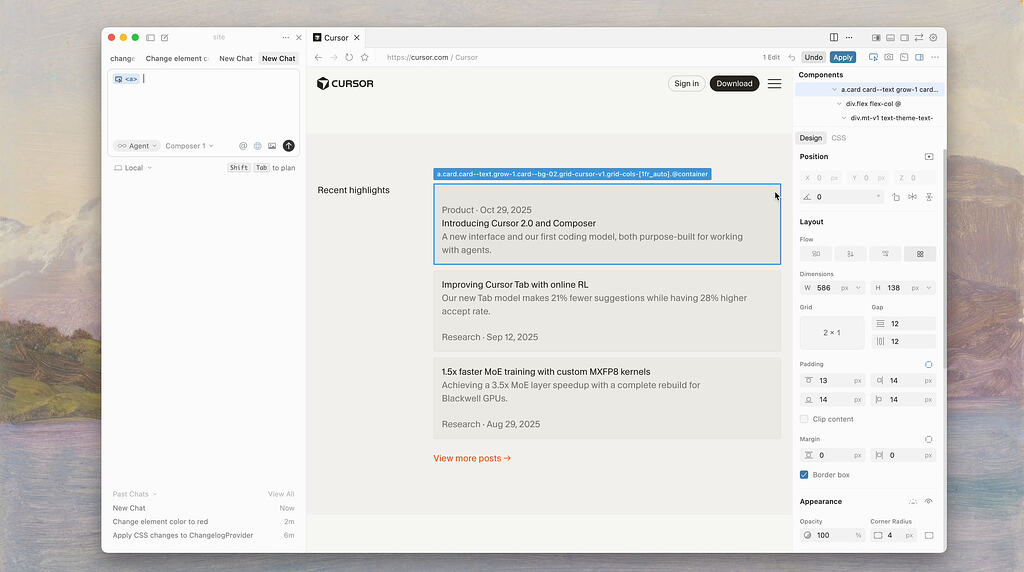
Cursor is an AI-native code editor that has gained significant traction since 2024 among professional developers. Built on VS Code, it’s immediately familiar — but with deeply integrated AI assistance that goes beyond simple autocomplete. Cursor can understand your entire codebase, answer questions about it, suggest multi-file changes, and help you debug issues through natural language conversation.
The free tier is generous enough to evaluate whether the AI-assisted workflow suits you. For developers who spend a significant portion of their time writing, refactoring, or debugging code, Cursor’s approach to AI integration is meaningfully different from VS Code with Copilot added on top.
Website: Cursor
Version Control

Web Design Tools: GitHub
GitHub
GitHub is where most of the world’s code lives — and for good reason. It provides free hosting for public and private repositories, pull request workflows for code review, project management tools, GitHub Actions for CI/CD automation, and GitHub Pages for hosting static sites at no cost.
If you’re a web designer who occasionally writes code, or a developer working on any kind of web project, having a GitHub account and knowing the basics of Git is now simply expected. It’s also where most open-source resources, frameworks, and tools are distributed from.
Website: GitHub

Web Design Tools: GitLab
GitLab
GitLab is a comprehensive DevOps platform that goes beyond code hosting to include built-in CI/CD pipelines, container registry, security scanning, and project planning tools — all in a single interface. For teams that want everything in one place, or organisations that need to self-host their version control infrastructure, GitLab is the strongest open-source option.
The free tier is substantial, covering most small team needs. Where GitLab particularly shines is in workflows that involve automated testing and deployment — it removes the need to stitch together separate tools for different stages of the development pipeline.
Website: GitLab
Graphics and Image Editing

Web Design Tools: GIMP
GIMP
GIMP (GNU Image Manipulation Program) is the most capable free image editor available, with a feature set that covers photo retouching, compositing, colour correction, and batch processing. It’s not as intuitive as Photoshop for new users, but the learning investment pays off for anyone who regularly needs to edit complex images without a Creative Cloud subscription.
Being open-source means it’s actively maintained and available on Windows, Mac, and Linux. For web designers who need to edit photographs, create graphics, or prepare assets for the web without a paid image editor, GIMP remains the strongest free option.
Website: GIMP

Web Design Tools: Inkscape
Inkscape
Inkscape is a free, open-source vector graphics editor that handles SVG natively — making it particularly useful for web work, where scalable vector assets are essential for logos, icons, and illustrations that need to look sharp at any size and on any display.
It’s cross-platform, actively maintained, and capable of producing professional-quality vector artwork. For designers who need to create or edit vector assets without paying for Illustrator, Inkscape is the go-to option.
Website: Inkscape
Icons and Illustrations

Web Design Tools: Font Awesome
Font Awesome
Font Awesome is the most widely used icon library on the web, with thousands of vector icons available in SVG and web font formats. Icons are fully styleable via CSS, scale cleanly at any size, and cover a vast range of categories — from interface and communication icons to brand logos and social media symbols.
The free tier covers a large proportion of what most projects need. Font Awesome icons are used across millions of websites, and the library is updated regularly with new additions.
Website: Font Awesome

Web Design Tools: Undraw
Undraw
Undraw provides a library of open-source SVG illustrations — free to use in any project without attribution. What makes Undraw particularly practical is the ability to customise the primary colour of every illustration directly on the website, making it straightforward to align visuals with your brand palette before downloading.
The library covers a broad range of themes — from technology and business to healthcare, education, and e-commerce — and is updated regularly with new illustrations.
Website: Undraw
Performance and Optimisation

Web Design Tools: Google PageSpeed Insights
Google PageSpeed Insights
PageSpeed Insights analyses the performance of any publicly accessible URL and returns a score alongside specific, actionable recommendations — covering both mobile and desktop. It uses real-world data from Chrome users alongside lab data from Lighthouse to give you a complete picture of how your pages perform.
Critically, it reports on Core Web Vitals — Largest Contentful Paint (LCP), Interaction to Next Paint (INP), and Cumulative Layout Shift (CLS) — which are Google’s user experience signals used as ranking factors. If you’re optimising a site for search performance, PageSpeed Insights should be part of your regular testing toolkit. You can read more about how performance affects visibility in our guide on how web design influences SEO.
Website: PageSpeed Insights

Web Design Tools: GTmetrix
GTmetrix
GTmetrix provides a more detailed performance breakdown than PageSpeed Insights alone, with waterfall charts showing exactly how each resource on a page loads, historical tracking so you can see whether changes improved or worsened performance, and the ability to test from multiple locations and devices.
The free tier covers most use cases well. For developers and designers doing serious performance work — particularly on WordPress sites where plugin and asset weight can be a real issue — GTmetrix gives you the granular data you need to diagnose and fix specific bottlenecks.
Website: GTmetrix
Collaboration and Project Management

Web Design Tools: Trello
Trello
Trello uses a kanban-style board system — cards organised into lists — that makes it easy to visualise what’s in progress, what’s waiting for review, and what’s done. It’s flexible enough to work for solo freelancers managing their own pipeline and for small teams coordinating across multiple projects.
The free tier includes unlimited cards and up to 10 boards per workspace, which covers most small-team and freelance workflows. Integrations with tools like Slack, Google Drive, and GitHub allow you to pull relevant context into your task cards without switching context.
Website: Trello

Web Design Tools: Slack
Slack
Slack has become the default communication platform for development and design teams — organising conversations into channels by project, topic, or team, with direct messaging, file sharing, and integrations with virtually every tool in the modern web stack.
The free tier retains 90 days of message history, which is sufficient for smaller teams and project-based work. For studios and agencies managing ongoing client relationships and multiple concurrent projects, the paid plan’s full message history and expanded integration options are worth considering.
Website: Slack
Conclusion
The range of free tools available to web designers and developers in 2026 is genuinely impressive. Whether you’re just starting out or looking to streamline an established workflow, most of the tools covered here have free tiers that are functional enough to use professionally — not just for trial purposes.
A few tools worth highlighting as the biggest changes from previous years: Figma continues to pull ahead as the design tool of choice, with AI features now built in; Cursor represents a meaningful step forward for AI-assisted development; and Penpot has matured into a credible open-source alternative for teams that need full control over their design infrastructure.
If you’re looking for guidance on which tools fit your specific project or workflow — or you’d like support with the design and development side — take a look at our web design services or get in touch.
FAQs
What are the best free web design tools in 2026?
The best free web design tools in 2026 include Figma for UI design and prototyping, Visual Studio Code and Cursor for code editing, GitHub for version control, GIMP and Inkscape for image editing, Font Awesome for icons, Undraw for illustrations, PageSpeed Insights and GTmetrix for performance testing, and Trello and Slack for project management and communication.
Is Figma still free in 2026?
Yes — Figma offers a free tier that covers solo designers and small projects, including up to three projects, unlimited personal files, and access to the core design and prototyping tools. Teams working across larger numbers of projects will need a paid plan.
What replaced Adobe XD?
Adobe XD entered maintenance mode in 2024 and is no longer available to new users as a standalone product. Figma is the most widely adopted alternative. Penpot is the best open-source alternative, particularly for teams who need self-hosting or prefer to avoid commercial cloud tools.
What happened to the Atom code editor?
GitHub officially discontinued Atom in December 2022. VS Code is the natural replacement for most users, and Cursor — built on VS Code with deep AI integration — is increasingly popular among developers who want AI-assisted coding as a core feature rather than an add-on.
Do I need to pay for web design tools to work professionally?
No — a fully professional web design workflow is achievable with free tools. Figma’s free tier, VS Code, GitHub, and the performance and graphics tools listed in this article are all used by working professionals. Paid tiers typically offer team features, more storage, or expanded limits rather than fundamentally different capabilities.
What free tools help improve website performance?
Google PageSpeed Insights and GTmetrix are both free and cover most performance testing needs. PageSpeed Insights is particularly important for Core Web Vitals monitoring, which directly affects search rankings. GTmetrix provides more granular waterfall analysis, making it better suited for diagnosing specific loading issues.
Are there free alternatives to paid design and illustration tools?
Yes. GIMP is a capable free alternative to Photoshop for raster image editing, and Inkscape covers most vector design use cases that would otherwise require Illustrator. Both are open-source, cross-platform, and actively maintained. Penpot is a free, open-source alternative to Figma for UI design and prototyping.

With over two decades of web design and development expertise, I craft bespoke WordPress solutions at FallingBrick, delivering visually striking, high-performing websites optimised for user experience and SEO.